Wednesday, May 15, 2013

Prompt User operator on a Dashboard prompt:


Hello All,

Previously the type of "operator" used on a dashboard prompt was fixed by the report developer e.g. "Is equal to / is in".etc. , so an end user could not able change to select the operator as per you his requirement.

To select the operator as per user requirement you can use Prompt User operator.
1: Go to dashboard prompt editor

For example :  I have Taken " Manager Name" as  prompt 


2: Edit the Manager Name Prompt and set the "Operator" to "* Prompt User":


3: You will see flexibility by allowing the end user choose which type of operator should be used to filter on the values.


- Thank you 
- Rakesh Patil 


Wednesday, April 10, 2013

OBIEE 11g Log - Files

Hello All,

So many people don't know the log file name and their path. This will be helpful for them.

1 . Log on to EM - Enterprise Manager Console
2 . Go to Business Intelligence –> coreapplications –> Diagnostics –> Log Messages
3 . Below is the Available log file Name.

• Presentation Services Log
• Server Log
• Scheduler Log
• JavaHost Log
• Cluster Controller Log
• Action Services Log
• Security Services Log
• Administrator Services Log


You can open manually log file from directory

Log File Name Path
NQQuery C:\OBIEE11g\instances\instance1\diagnostics\logs\OracleBIServerComponent\coreapplication_obis1
NQServer C:\OBIEE11g\instances\instance1\diagnostics\logs\OracleBIServerComponent\coreapplication_obis1
NQSAdminTool C:\OBIEE11g\instances\instance1\diagnostics\logs\OracleBIServerComponent\coreapplication_obis1
NQSUDMLexce C:\OBIEE11g\instances\instance1\diagnostics\logs\OracleBIServerComponent\coreapplication_obis1
SAW log C:\OBIEE11g\instances\instance1\diagnostics\logs\OracleBIPresentationServicesComponent\coreapplication_obips1
JavaHost C:\OBIEE11g\instances\instance1\diagnostics\logs\OracleBIJavaHostComponent\coreapplication_obijh1
NQScheduler C:\OBIEE11g\instances\instance1\diagnostics\logs\OracleBISchedulerComponent\coreapplication_obisch1
NQCluster C:\OBIEE11g\instances\instance1\diagnostics\logs\OracleBIClusterControllerComponent\coreapplication_obiccs1
ODBC All Log Regardaing OPMN will found in C:\OBIEE11g\instances\instancke1\diagnostics\logs\OPMN\opmn

-Thanks
-Rakesh Patil

Wednesday, April 3, 2013

Friday, March 22, 2013

Configuration Files – OBIEE 11g


 Hello All,

Please find the OBIEE 11g Configuration file.

Oracle BI Server

1.   NQSConfig.INI
2.   Logconfig.xml
3.   DBFeatures.in
Location
OBIEE11g\Instance\Instance1\config\OracleBIServerComponent\coreapplication_obisn

Oracle BI Presentation Services
4.   Instanceconfig.xml 
Location OBIEE11g\Instance\Instance1\config\OracleBIPresentationServicesComponent\coreapplication_obipsn

Cluster Controller
5.   NQClusterConfig.INI
6.   ccslogging.xml
Location
OBIEE11g\Instance\Instance1\config\OracleBIApplication\coreapplication

Orcle BI Scheduler
7.   instanceconfig.xml
8.   ccslogging.xml
Location
OBIEE11g\Instance\Instance1\config\OracleBISchedulerComponent\coreapplicati on_obischn

Component - JaveHost
9.        config.xml
10.        logging_config.xml
Location
OBIEE11g\Instance\Instance1\config\OracleBIJavaHostComponent\coreapplication_obijhn

-Thanks 
-Rakesh Patil 

Friday, March 15, 2013

Timestamp Query


Hello All,

Please find the time-stamp important query. All timestamp query are very important while developing the Report.

Yesterday’s   Date_yesterday

Current Day  : Current_Date

Last week Week function  : is between  @{Date_7_Days_Ago} and @{Current_Date}

First Day of the Previous Year

TIMESTAMPADD( SQL_TSI_YEAR , -1, TIMESTAMPADD( SQL_TSI_DAY , EXTRACT( DAY_OF_YEAR FROM CURRENT_DATE) * -(1) + 1, CURRENT_DATE))

First Day of the Current Year 

TIMESTAMPADD( SQL_TSI_DAY , EXTRACT( DAY_OF_YEAR FROM CURRENT_DATE) * -(1) + 1, CURRENT_DATE) 
First Day of the Next Year 

TIMESTAMPADD( SQL_TSI_YEAR , 1, TIMESTAMPADD( SQL_TSI_DAY , EXTRACT( DAY_OF_YEAR FROM CURRENT_DATE) * -(1) + 1, CURRENT_DATE)).

First Day of the Previous Month 

TIMESTAMPADD(SQL_TSI_MONTH, -1, TIMESTAMPADD( SQL_TSI_DAY , DAYOFMONTH( CURRENT_DATE) * -(1) + 1, CURRENT_DATE)) 
First Day of the Current Month

TIMESTAMPADD( SQL_TSI_DAY , DAYOFMONTH( CURRENT_DATE) * -(1) + 1, CURRENT_DATE)
First Day of the Next Month

TIMESTAMPADD(SQL_TSI_MONTH, 1, TIMESTAMPADD( SQL_TSI_DAY , DAYOFMONTH( CURRENT_DATE) * -(1) + 1, CURRENT_DATE))

First Day of Current Quarter

TIMESTAMPADD( SQL_TSI_DAY , DAY_OF_QUARTER( CURRENT_DATE) * -(1) + 1, CURRENT_DATE)

Last Day of the Previous Month 

TIMESTAMPADD( SQL_TSI_DAY , -(1), TIMESTAMPADD( SQL_TSI_DAY , DAYOFMONTH( CURRENT_DATE) * -(1) + 1, CURRENT_DATE))

Last Day of Current Month 

TIMESTAMPADD( SQL_TSI_DAY , -(1), TIMESTAMPADD( SQL_TSI_MONTH , 1, TIMESTAMPADD( SQL_TSI_DAY , DAYOFMONTH( CURRENT_DATE) * -(1) + 1, CURRENT_DATE))) .

Last Day of the Next Month 

TIMESTAMPADD( SQL_TSI_DAY , -(1), TIMESTAMPADD( SQL_TSI_MONTH , 2, TIMESTAMPADD( SQL_TSI_DAY , DAYOFMONTH( CURRENT_DATE) * -(1) + 1, CURRENT_DATE)))
Last Day of Previous Year 

TIMESTAMPADD( SQL_TSI_DAY , -1, TIMESTAMPADD( SQL_TSI_DAY , EXTRACT( DAY_OF_YEAR FROM CURRENT_DATE) * -(1) + 1,
CURRENT_DATE))

Last Day of Current Year 

TIMESTAMPADD(SQL_TSI_YEAR, 1, TIMESTAMPADD( SQL_TSI_DAY , -1, TIMESTAMPADD( SQL_TSI_DAY , EXTRACT( DAY_OF_YEAR FROM CURRENT_DATE) * -(1) + 1, CURRENT_DATE)))

Last Day of the Next Year 

TIMESTAMPADD(SQL_TSI_YEAR, 2, TIMESTAMPADD( SQL_TSI_DAY , -1, TIMESTAMPADD( SQL_TSI_DAY , EXTRACT( DAY_OF_YEAR FROM CURRENT_DATE) * -(1) + 1, CURRENT_DATE)))
Last Day of Current Quarter

TIMESTAMPADD( SQL_TSI_DAY , -(1), TIMESTAMPADD( SQL_TSI_QUARTER , 1, TIMESTAMPADD( SQL_TSI_DAY , DAY_OF_QUARTER( CURRENT_DATE) * -(1) + 1, CURRENT_DATE))) 
Number of days between First Day of Year and Last Day of Current Month

 TIMESTAMPDIFF(SQL_TSI_DAY, CAST('2010/01/01 00:00:00' AS DATE), TIMESTAMPADD( SQL_TSI_DAY , -(1), TIMESTAMPADD( SQL_TSI_MONTH , 1, TIMESTAMPADD( SQL_TSI_DAY , DAYOFMONTH( CURRENT_DATE) * -(1) + 1, CURRENT_DATE))))

Thanks you
-Rakesh Patil
-rakeshpatil002@gmail.com


Friday, March 8, 2013

Replace Null Values in an OBIEE


Hello All,

Suppose user wanted to display numeric values in specified format, replace the null values in table, or pivot table with zeros or custom text.

Output Format: Below is the screen shot he is looking to generate. He wanted to put the Name in front of Cost Value


Step:
1.       Create a simple report. I am using the Patil RPD here.
2.       A pivot table view of this data would look something like this by default:

3.      
4.       Now, go to Criteria tab and Go to edit column properties. (Using custom    data format we can specify the custom formatting of columns used in an analysis. This formatting will be applied in report’s tables and pivot tables. To edit a data format for a given column, right click on it and choose Column Properties.)


5.      Select the Data formate  and Check the “Override Default Data format” and Select the Cutom and put the format Name as per screen shot


Here are some examples of using custom numeric masks:
- We can display the values in thousands with K (kilo) letter
#,#.0,Rakesh
- Values in millions with Patil
#,#.0,,Patil
- Values in billions with P
#,#.0,,,Patil
- Add a currency symbol
£# or $#

Explanation
‘#’ is a number sign indicating significant digits
‘#,#’ adds a comma separator for thousands
‘.0’ indicates the number of decimal places (‘0’ for round number, ‘.0’ for one decimal place, ‘.00’ for two, etc.)
‘,’ is a thousand separator (‘,’ for thousands; ‘,,’ for millions, ‘,,,’ for billions etc.)
‘Rakesh’,Patil’,’P’, ‘$’,‘£’ are characters that can be added after or before the number mask
The syntax for custom data formatting for numeric values is:
positive value mask ; negative value mask ; null mask
If we specify the mask without semicolon, the changes will apply to both positive and negative values.
- We can indicate positive values with plus sign (+) and negative values with minus sign (-)
+ #,#.0;- #,#.0

6.       Click on Ok and check the report you will see same output how user was looking.

Monday, February 4, 2013

Upload a fixed excel layout file in OBIEE

Hello All,


You Can upload the fixed excel layout file in OBIEE UI.
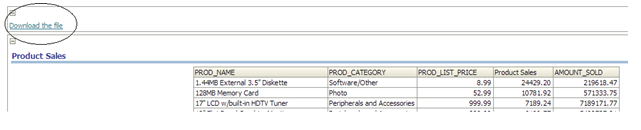
For Example suppose client asking for below output. He need fixed excel file + Report. Where never he will click on “Download the file” The fixed excel file should have to download.
  

Solution:
1.       Go to catalog manager and create the folder Excel.


2.      Click on more and upload the file. I have upload the file  “Test.xlsx”’
3.       Go To Dashboard, Insert a Link or image onto dashboard as seen in the screenshot
Put the path : saw.dll?downloadFile&path=/users/weblogic/Excel/Test.xlsx
4.       Save the dashboard and run.
5.       Click on the “Download the file”, you will file is downloaded.


Tuesday, January 29, 2013

Connection Failed Error – While Importing Data – OBIEE11g


I have installed OBIEE 11.1.1.5.0. When I started creating a repository and enter the data source and hit next, it throws an error "The connection has failed". I have referred to different forums to resolve this issue.
Step:
1.    Copy the tnsnames.ora file from Oracle Database.
Path : C:\oracle\product\10.2.0\db_1\network\ADMIN
2.    paste the file to the below location in OBIEE11g directory
C:\OBIEE11g\Oracle_BI1\network\admin
C:\OBIEE11g\oracle_common\admin
3.    Add the tnsnames file location path in User.cmd file
4.    User.cmd path C:\OBIEE11g\instances\instance1\bifoundation\OracleBIApplication\coreapplication\setup
5.    Closed you’re RPD and reopen late
6.    After doing this I am able to import the data from oracle database.

-RAKESH PATIL